
01 / SCATTER
Six consoles, six numbers
DeepSeek, OpenRouter, Moonshot, xAI, MiniMax, and fal each keep their own balance page. You check them one at a time, usually after something stalls.
 burnclock
/
AI budget visibility
Live on PyPI
burnclock
/
AI budget visibility
Live on PyPI
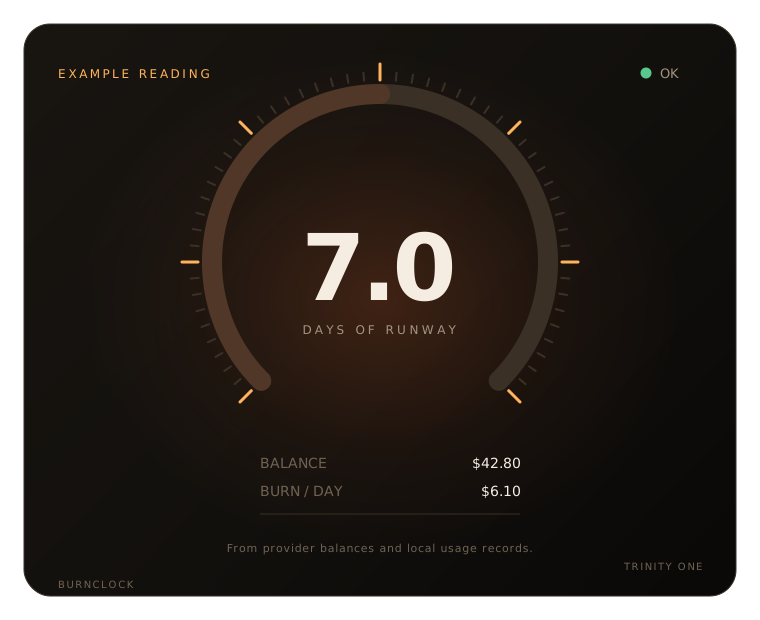
Your providers will tell you what is left. They will not tell you how long it lasts. burnclock reads their balances and your own usage records, then shows burn per day, days of paid runway, and the date your budget runs out.
Install from PyPI See the table
Free and open source, MIT licensed. Python 3.12+. Read-only: burnclock never tops up, spends, or changes anything on a provider account.
The gap
A number in a console tells you what remains. It does not tell you what happens next.
01 / SCATTER
DeepSeek, OpenRouter, Moonshot, xAI, MiniMax, and fal each keep their own balance page. You check them one at a time, usually after something stalls.
02 / RATE
Forty dollars is two days at twenty a day, or two weeks at three a day. The balance alone cannot tell you which one you are looking at.
03 / FAILURE
If the only check is a balance, a dead key and an exhausted account look the same. One needs a new key. The other needs money.
04 / ANSWER
Balance, burn per day, days of paid runway, and the projected date your monthly budget line is crossed. Per provider, from the numbers your own account returns.
The command
Run it with no arguments. burnclock prints every configured provider and stops guessing.
$ burnclock

┌────────────┬───────┬───────────┬──────────┬───────────────┐
│ Provider   │ State │ Balance   │ Burn/day │ Runway (paid) │
├────────────┼───────┼───────────┼──────────┼───────────────┤
│ DeepSeek   │ OK    │ 42.80 USD │ 6.10     │ 7.0 d         │
│ OpenRouter │ EMPTY │ -0.09 USD │ 8.08     │ -             │
└────────────┴───────┴───────────┴──────────┴───────────────┘

$ burnclock badge
DeepSeek $42.80 · 7.0d
$ burnclock

DEEPSEEK      OK
  balance     42.80 USD
  burn/day     6.10
  runway       7.0 d

OPENROUTER    EMPTY
  balance     -0.09 USD
  burn/day     8.08
  runway       -

$ burnclock badge
DeepSeek $42.80 · 7.0d
If a provider cannot answer, its row says so. burnclock never turns a failed request into a zero balance.
What you get
A small tool with a narrow job: tell you where the budget stands, and make the answer usable in a terminal, a prompt, or a script.
Runway
Balance, burn per day, days of paid runway, and the projected date your monthly budget line is crossed. Set a monthly budget per provider; preview any change with --dry-run before it writes.
Budgets are optional. Without one, burnclock still reports balance, burn, and runway; the budget line only adds a crossing date.
Failure
A rejected key is not an empty account. Distinct states tell you whether to rotate a key, fix a scope, or add funds.
Each state has a different next action. The table never collapses them into one error.
Surfaces
A one-line badge for zsh, tmux, or the Hermes desktop status bar. It reads a cached file, so your prompt never waits on a network call.
Automation
status --json returns a stable envelope. Exit codes separate internal errors, usage, config, auth, threshold, and unreachable, so cron jobs and agents can act on the result.
Coverage
Two balance APIs are verified against live accounts. Four more are documented and ship disabled until their response shapes are verified. Nothing is guessed.
| Provider | Balance source | Verification |
|---|---|---|
| DeepSeek | GET /user/balance | Live-verified |
| OpenRouter | GET /api/v1/key + /credits | Live-verified |
| Moonshot | GET /v1/users/me/balance | Documented, off by default |
| xAI | Management API prepaid balance | Documented, off by default |
| MiniMax | account/query_balance or token_plan/remains | Documented, off by default |
| fal | account/billing | Documented, off by default |
Providers without a balance API still get an honest row: NO_API for spend-only records, NOT_QUERYABLE for console-only accounts. A failed request is ERROR or UNREACHABLE, never $0.
Why it exists
We run agent fleets on metered APIs. The question that kept interrupting the work was not "what is my balance?" It was "how many days does this budget have left?" The consoles answered the first question and left the second one to arithmetic, at the worst possible moment.
burnclock started as a local script that read provider balances, joined them to the usage records Hermes already kept, and printed one table. It ran on the same machine as the agents. It still does.
The rules came from that use: never write to a provider, never store a key in config, and never turn a failed request into a number. The output is an estimate, and it says so.
Install burnclock, point it at the keys you already use, and see your real runway in one command.
Install with pipx
$ pipx install burnclock
or: uv tool install burnclock
Install from PyPIFree and open source. Estimates, not billing truth.